This article is part of our Print Then Cut section of the Mastering Cricut Design Space learning hub.
It is a question we see over and over and over again in crafting groups: Why won’t my black ink dry when I try to Print & Cut???
Your prints smudge or flake, but weirdly, just the black ink. Why?
Inevitably, people tell you that your printer settings are to blame. Wrong! 99.9% of the time it is because your printer ink is not compatible with the printable media you’re trying to use. You’re probably trying to print pigment ink on incompatible glossy cardstock or sticker paper.
Pigment Ink vs Dye-based ink
Home inkjet printers use CMYK ink sets: cyan (C), magenta (M), yellow (Y), and black (K=”key plate”, an old-timey printing term). These CMYK inks are typically one of 2 basic types: pigment ink or dye-based ink. These ink types both consist of a colorant (the substance that gives the ink its color) in a water-based solution, but they differ substantially.
Pigment ink:
- colorant particles are suspended in solution, not dissolved
- colorant remains on the surface of the printed material
- long-lasting, fade- and water-resistant, often called “archival quality”
- commonly found as the black ink in the CMYK set, especially Canon and HP inkjets
Pigment-based black produces crisp text that doesn’t run if something spills on it or your mail gets rained on. This makes it a popular choice for office printing. Full CMYK pigment ink sets are often used for art prints, and pigment inks tend to look vibrant on matte finish papers.
Dye-based inks:
- colorant is dissolved in water-based solution
- colorant is absorbed into the fibers of the printed material
- not water-resistant, fades more quickly than pigment
Dye-based inks are often used for their vibrant colors and lower cost. Because they are absorbed into the surface of the material they’re printed on, they tend to be more muted on a matte surface but look more vibrant on glossy papers. The CMY colors in most home inkjets tend to be dye-based, even when the black is a pigment ink.
Materials incompatible with pigment ink
If you find that the colors of your print dry, but the black ink smears or flakes off, it’s almost certainly because you’re using a printable material that is incompatible with pigment inks.
Most photo papers and printable vinyl/sticker paper (especially matte finish) are compatible with pigment ink. That said, there are some options on Amazon (which is where most of us get printables) that are NOT compatible with pigment ink. These are glossy papers/printable vinyl with coatings that prevent pigment particles from adhering to the surface.
Case in point: Uinkit glossy 80lb photo cardstock, which I use for double-sided Print Then Cut cards, is compatible with my dye-only inkjet (Epson ET2800), but NOT pigment ink. If you use this with a Canon PIXMA, the black ink will not set properly, and will smear.
Side note: you will recognize Uinkit packaging by the bizarre collection of costumed squirrels.
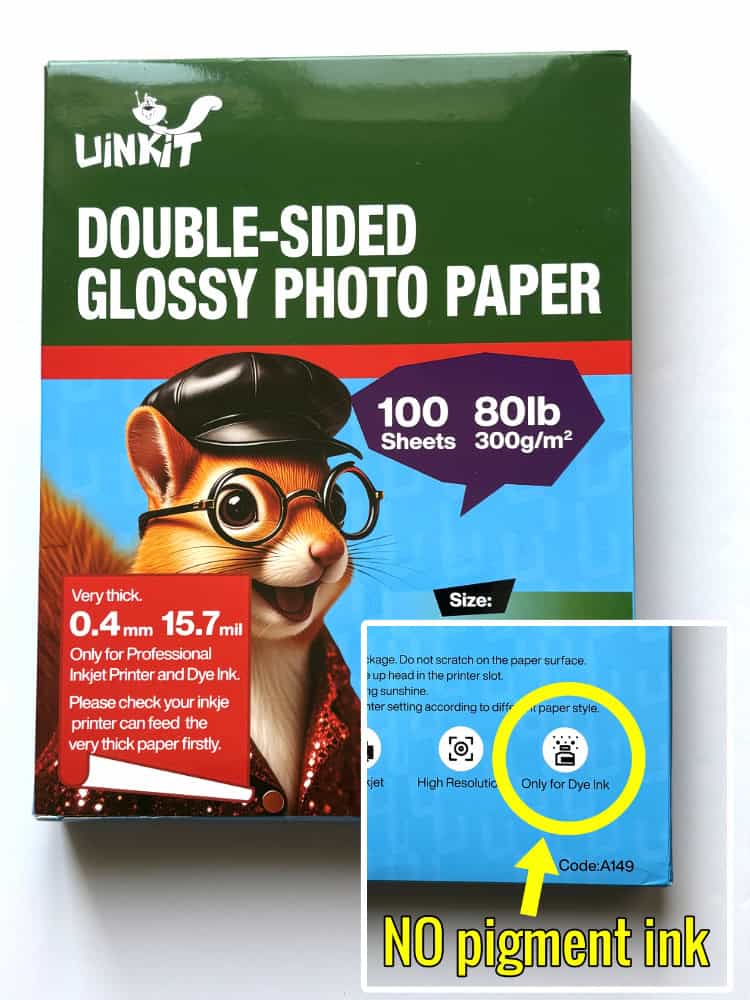
A few examples of printables specifically labeled as not compatible with pigment ink:
Some companies will explicitly state this, but you’ll also see some media labeled as compatible with all inkjets, but when you look at the reviews you see people saying that their black or other pigment ink never dries after printing. Buyer beware!
What kind of ink does *my* printer use?
Your printer probably uses pigment black and dye-based colors. I suggest looking at the technical specs for your specific printer so you know exactly what kind of ink you’re using, and you can make sure to choose compatible materials.
Sometimes this information is a little tough to find, but these are the broad strokes for popular models of printer.
Epson
The most popular models of Epson printers, the EcoTanks, can use either dye-based or pigment-based inks. The model I have, the ET2800, uses all dye-based inks, but many EcoTanks come with dye-based colors and pigment black (e.g. ET2850, 4850, 15000, 2980, etc.).
The most common Epson EcoTank inks are coded T502 or T522.
- T502 ink (CMYK) – Black ink is pigment-based, CMY inks are dye-based
- T522 ink (CMYK) – The full ink set is dye-based
You can go to the Epson Inkfinder page and enter your printer model number to find the compatible ink.
Canon
Most Canon PIXMA printers use pigment black and dye-based color inks. It’s easy to determine what kind of ink your printer is using, because Canon uses a handy code to identify ink type on their cartridge and bottle refills. If it has a “PG” prefix, it’s pigment ink. A “CL” prefix (meaning Color Life) means it’s dye-based. If the code isn’t there (like the ink for their PIXMA MegaTank printers), they will tell you the ink type in the printer’s Specifications tab on the Canon website.
HP
The most popular HP printer series for home users, Deskjet and Envy, use cartridges with pigment black and dye-based color ink. HP Smart tank printers also use the pigment/dye combination.
To verify the ink type in an HP printer, look up the printer model number and look for the technical specs section. HP provides this information in a section labelled “Compatible Ink Types“
- HP64 ink, used in the Envy series: pigment black, dye-based CMY
- HP67 ink, used in the Deskjet series: pigment black, dye-based CMY
- HP31/32, used in the HP Smart Tank series: pigment black, dye-based CMY
What materials are compatible with pigment ink?
The good news is that almost all popular printables are compatible with pigment ink. Matte coatings on inkjet-printable vinyl are designed to be receptive to pigment- and dye-based inks, and pigment inks actually tend to look better than dye-based inks on matte cardstock.
There are glossy sticker papers and printable vinyl compatible with pigment inks, but you can also just use matte sticker sheets covered with a glossy overlay. I’d recommend steering clear of glossy papers or cardstock unless the manufacturer specifically states it is compatible with pigment inks.
My recommendation is to know what kind of ink your printer uses, then choose your printable materials accordingly. No change in printer settings will fix the problem if you’re trying to print on incompatible material, so it’s best to check carefully before you buy.
Before you go…
You might want to check out our tutorials on double-sided Print Then Cut techniques. This surprisingly simple technique gets great results when making cards, cake toppers and more. Check out these two posts on creating a double sided print and cut card, and how to get double sided text without mirroring!