
This article is part of Snip to It’s Design Space Mastery series, focusing on setup, files and troubleshooting.
If you’re new to the world of cutting machines, you are probably starting to hear about SVG and PNG image files.
What do these abbreviations mean? What kind of image file can be used to make that cute card, or turn that picture into a sticker?
This explainer will teach you the differences between the image file types that can be uploaded into Design Space, what each file is best suited for, and why it matters anyway.
Why do file types matter?
One of the important features of Design Space is that you can use your own images to make your projects. Sure, there’s a big library of images you can access, but sometimes you’re wanting to make something you found outside of Design Space. In that case, you can upload an image and add it to the Canvas.
But not all types of images are compatible with Design Space, and some image types can only be used in certain ways with your Cricut.
Figuring out the difference between image file types will boost your confidence when crafting, cut down on mistakes and material waste. And when you’re out in the world, you’ll see a cool image somewhere and you’ll be able to recognize, “that’s a [blank], I know exactly how to use that!”
The most important lesson: Vector image vs Raster image
The crafting software world relies on 2 main types of images: Vector and Raster.
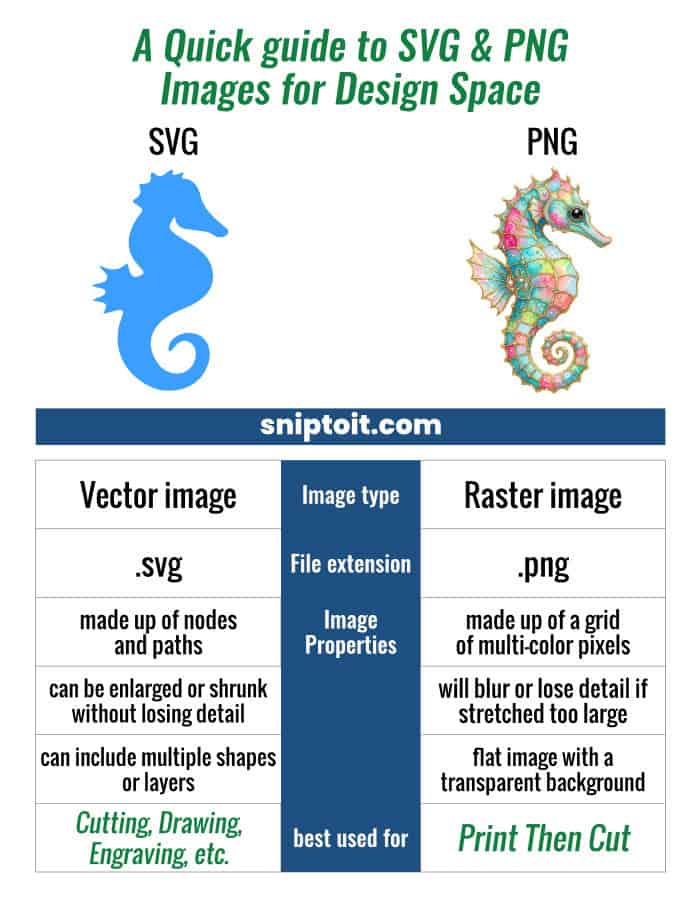
Vector images are made up of nodes connected by lines and curves. The information contained in the file plots the position of the nodes, the angles and curves of the lines, and the color of the fill in each shape. These images are well suited for cutting.
Raster images (also called bitmaps) are made up of a grid of pixels (colored squares). These images are best suited for Print Then Cut projects.

What is an SVG?
SVG (Scalable Vector Graphic) is a basic type of vector image used in crafting software, printed illustration projects, and web graphics. Its main advantage is that it can be used to present an image in any physical size without losing image quality.
SVG files are the primary vector image type used by Design Space. They are the most common vector image types available for sale or free for craft cutting projects. SVG files can contain multiple layers, which is why they are commonly used for multi-color vinyl or cardstock projects.
When a Cricut machine cuts an image out of vinyl, it is running the blade along the vector paths, from node to node.
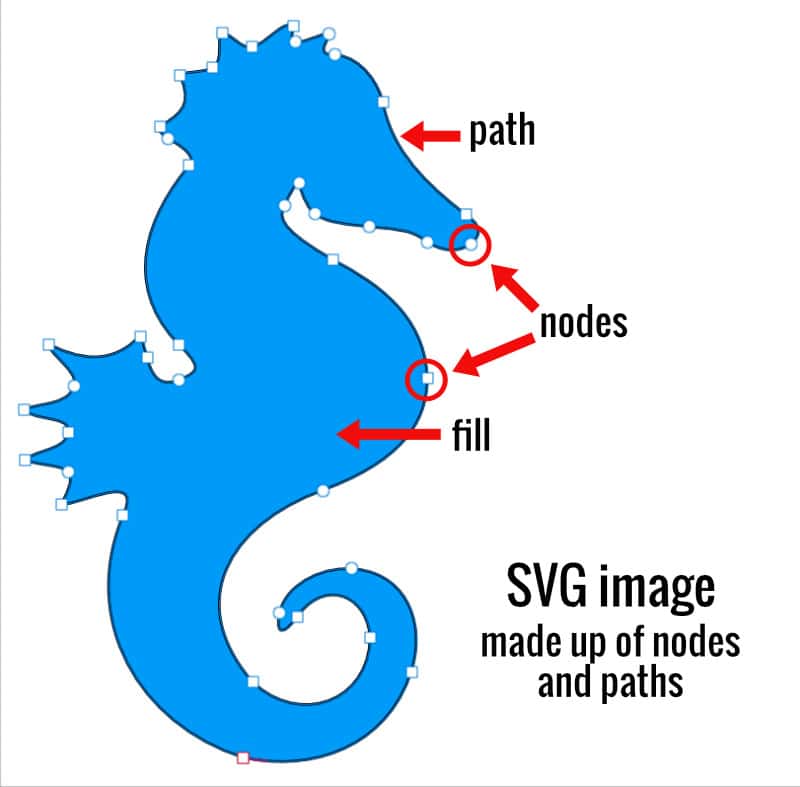
Because all data stored in the file is essentially mathematical information, the file size can be quite small, even if you expand the image size to be as large as a billboard. No matter how big or small you make it, you cannot diminish the image quality. SVGs = math-based images.
What is a PNG?
A PNG (Portable Network Graphic) file is a raster image made up of pixels that is capable of having a transparent background. This is the most common file format used for Cricut’s Print Then Cut, and when you see sticker projects, you are more than likely seeing PNG files.
When you upload a PNG, Design Space traces the outer edge of the image to create a vector cut line, even though the PNG does not have nodes or paths.
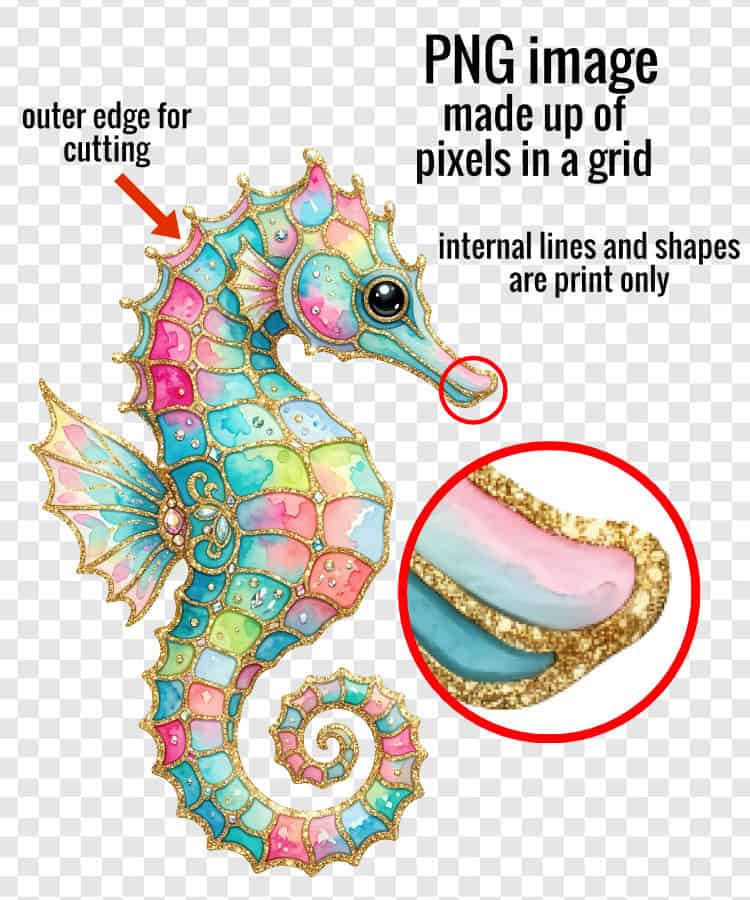
PNG files can be any style of image: an actual digital photo, a watercolor illustration of a flower or a comic book-style character. It doesn’t matter how these images were made, but they can all be converted to a pixel-based image with a transparent background.
What is a JPG?
A JPG (or JPEG, Joint Photographic Experts Group) is a very common raster image file, usually showing up as digital photos. Any digital image can be saved as a JPG however, and the biggest difference between a PNG and a JPG is that a JPG will have a solid background.
If we try to import a JPG into Design Space, we cannot cut around the natural edge of the image. Instead, Design Space will cut around the outer rectangle of the entire image.
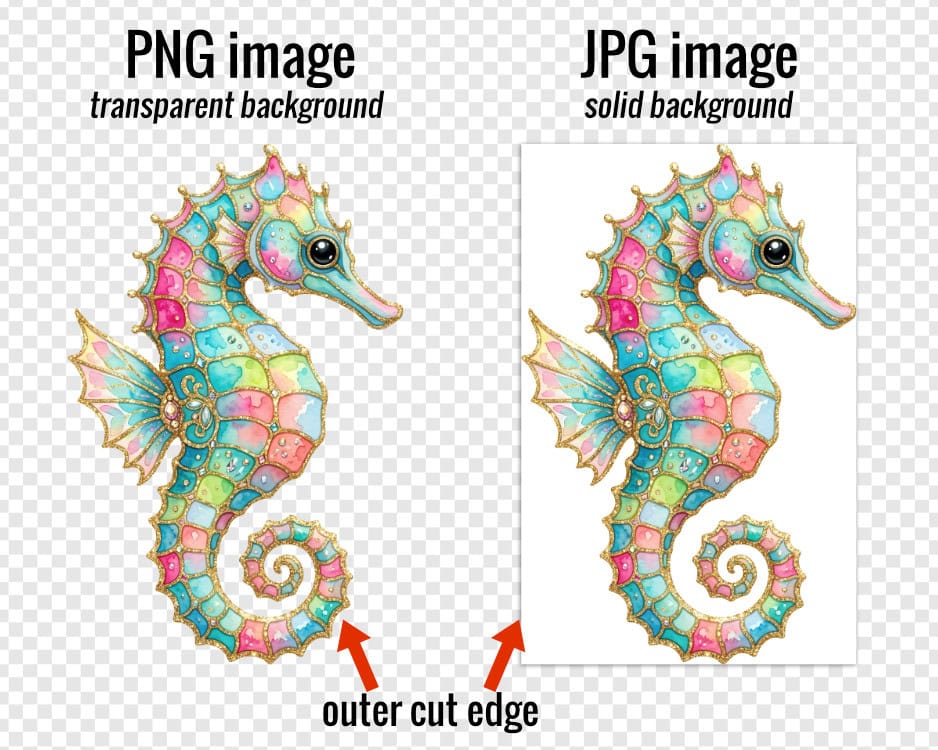
Unless you want to include the background (a common choice if you are using photos in your crafts), you would need to use the background remover tools in Design Space before you can cut around the edges of the image itself.
Related: What are the best background remover tools for crafters?
How to tell the difference between different image types
If you are not sure what kind of file you have, the most straight forward way to figure it out is to look at the file extension in the folder where it lives on your computer.
If you save a file to your Downloads folder on your computer, open that folder using your File Browser (Mac) or File Explorer (Windows). You should see the file listed with the extension (.svg/.png/.jpg).
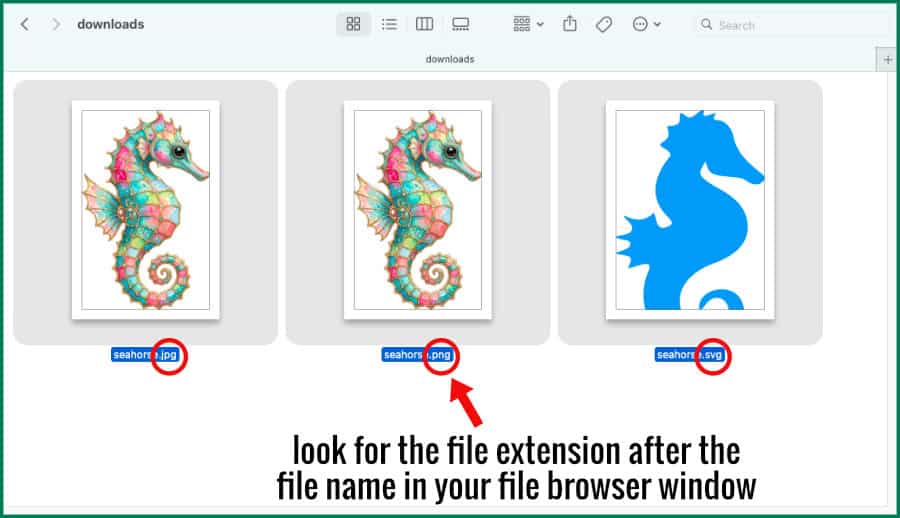
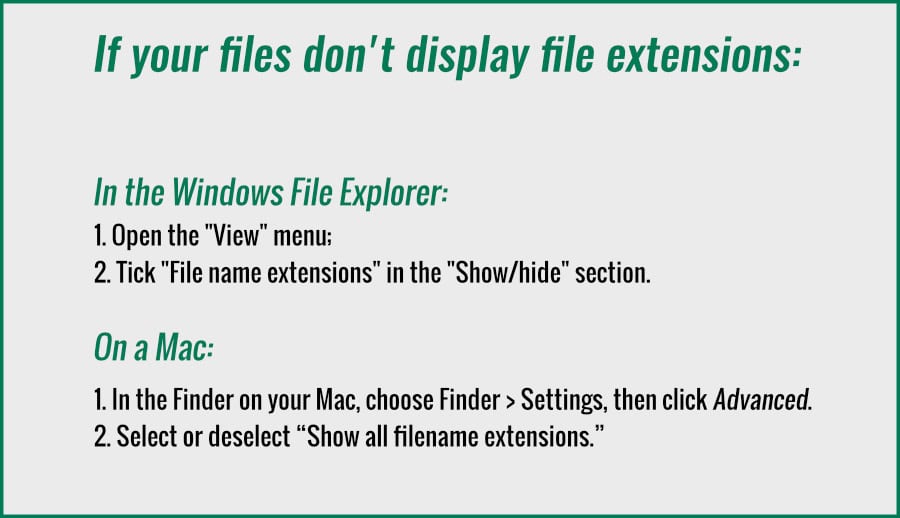
If you are in Design Space, all SVG files are assigned Basic Cut as the Operation. You should be able to see the grid squares behind it. PNG files are assigned Print Then Cut by default, and should also have transparent backgrounds. JPG images will also be assigned Print Then Cut by default, but you will see a white box in the background of your image.

Other File formats that work in Design Space
- GIF – Low resolution raster file that can have a transparent background. Use a PNG file if at all possible
- BMP – Older raster file format that does not support transparency. Use a PNG file if available
- HEIC – This is the native file format for Apple iPhone photos. Photos exported from an Apple device are usually converted to JPG, but it is possible to export them in their original HEIC format
- DXF – A type of vector file commonly used by CAD (Computer-Aided Design) software, laser engravers, CNC (Computer Numerical Control) machines and the free version of Silhouette Studio. These files can contain many more node points than an SVG file
File formats that DO NOT work in Design Space
- ZIP – this is a type of compression folder that contains other files. If you download an SVG or PNG from Etsy or Creative Fabrica, it may come inside a ZIP file. The contents of the ZIP must be extracted before you can use them in Design Space.
- PDF – Although a PDF can contain vector or raster graphics in addition to text, it cannot be opened by Design Space (the same goes for Word and Excel files)
- Adobe Photoshop and Illustrator files – File formats like PSD, AI or EPS are not accepted in Design Space
When to use each type of file
Use SVG files to cut shapes and layers out of cardstock or vinyl. Any operation (draw, cut, foil, score, etc) can be assigned to an SVG on the Canvas. They are the most flexible type of image you can use in Design Space.
Use PNG files for Print Then Cut projects. You can use them to create stickers, or artwork for cards, or anything else you might want to make with your printer and your Cricut. This filetype is also typically used for DTF (Direct to Film) or sublimation designs.
If all you have is a JPG image, I would use it cautiously in Design Space. You can upload it and use the background remover tools during that process, but you run the risk of creating an outer edge that is messy and difficult to cut with your Cricut.
SVG vs PNG Quick Reference Chart
In case you need a refresher on SVG vs PNG files, feel free to download this handy PDF cheat sheet and keep it close at hand. Click the image below to get the full size version on our Resource Library Page. Whenever you get stuck, you can refer to this chart and work through the problem.
Can I convert a JPG or PNG to an SVG?
It is possible to use tracing tools to convert raster images to vectors. Design Space has a tool that can convert PNG or JPG images to layered cut files, and it’s possible to use other free tools like Photopea to make this conversion.
Check out this article about converting images to cutting images for the exact steps I use to trace bitmap images to SVG files.
How to upload files to Cricut
Now that you understand the difference between SVG, PNG and JPG files, the next step is learning how to upload them into Cricut Design Space. The process is slightly different depending on the file type.