
Updated November 2, 2023
This article covers our chart of EasyPress settings for Cricut Iron-On materials. It is an at-a-glance printable version of the information in Cricut’s online Heat Guide, providing recommended time, temperature, and pressure settings for every combination of Iron On + base material.
So, if you’d like a simple printout of settings for using your EasyPress rather than messing with an app, this is the guide for you!
(Our printable Cricut Iron On + EasyPress Time/Temp chart is updated regularly!)
Update November 2023: new materials were added. Smart Iron-On – Prismatic, Printable Iron-On for Light Fabrics, Printable Iron-On for Dark Fabrics.
Update March 2023: new materials were added: Glow-in-the-Dark, Reflective, and UV Color Change Iron-On.
We also completely updated the chart to reflect 3 big changes in the Cricut Heat Guide:
1. No more flipping and re-pressing! Cricut no longer instructs users to flip and re-press from the back when using an EasyPress with Cricut Iron-On
2. Almost all materials require pressing with firm pressure, with few exceptions
3. The Cricut Heat Guide no longer provides time/temp values when using a towel rather than a Cricut pressing mat. The updated guide is for EasyPress + Mat ONLY, but you can still download our old guide for EasyPress + Towel in the Resource Library
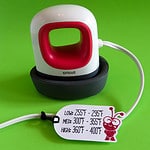
Update March 2023: we have also published a full guide to using the Cricut EasyPress Mini, including printable time/temp charts for Cricut Iron-on and a guide for using the mini with Siser and other HTV brands.
About our printable Cricut heat press guide
The first thing you might noice about our printable chart is that it’s 5 pages long. That’s a lot larger than many other guides out there. Why?
Cricut offers unique time and temperature settings for 23 different iron-on styles and over 20 different base materials. Loading all that information into one chart was too much.
In order to make our chart readable, understandable, and easy to use, we broke it up into 5 categories:
- Garment fabrics (cotton, cotton canvas, poly/cotton, mesh, nylon and polyester)
- Craft fabrics (burlap, faux leather, felt, muslin and neoprene)
- Specialty materials (cardstock, chipboard, corkboard and wood)
- Cricut blanks (baby bodysuit, cosmetic bag, pillow cover, tote bag, t-shirt, wine bag)
- Infusible Ink settings (settings for Cricut blanks plus infusible ink, marker or transfer sheets)
These charts all refer to settings for the EasyPress or EasyPress 2 (we verified that they use the same settings) used with a pressing mat.
(Cricut previously provided settings for the EasyPress 2 in combination with an EasyPress mat and separate settings for an EasyPress 2 + towel. They no longer offer settings in their heat guide for pressing with a towel. We will continue to provide access to our old chart for EasyPress + towel, but we won’t be updating it)

[Download this heat press temperature chart as a PDF]
How to read the EasyPress + Cricut Iron-On settings charts
Top of page
Here’s where you can see at a glance what materials are covered in this chart. In this case it’s “Garment Fabrics“. You can also tell at a glance that the values are for the EasyPress and the EasyPress mat.

We’ve also included very important information that applies to all Cricut Iron-On vinyl:
- Pre-heat the base material for 5 seconds before pressing
- Use firm pressure, unless otherwise noted. (This is a recent change by Cricut. Previously, they instructed most users to use light pressure and flip their project and repress from the back. They now recommend a single press with firm pressure.)
Menu Bar

This section shows the specific Iron-On variety in the left hand column followed by the base material names.
Chart Body
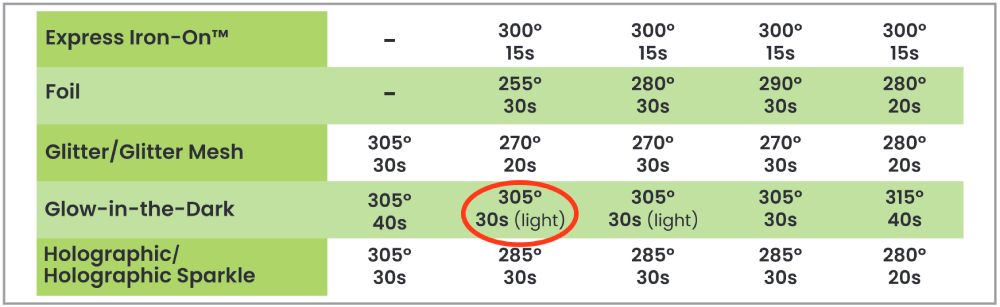
The temperature for each different Iron-On and base material combination is given in degrees Fahrenheit. The press time is indicated in seconds. If there is an exception to firm application pressure, it is noted in brackets next to the time (eg. “light”).
A dash “–” indicates that the Iron-On and base materials are incompatible according to Cricut.
Notes Section

At the bottom of each sheet are notes regarding carrier sheet peel instructions. In this case, the notes indicate that all Cricut iron-on carrier sheets should be peeled cold, with the exception of Mosaic.
Does this guide work for other Cricut heat presses?
This printable guide is exclusively for the Cricut EasyPress used with Cricut Iron On. Settings for the Cricut Hat Press, Mug Press, and Autopress are different and you will have to consult the Cricut Heat Guide.
We also have guides for using the EasyPress Mini with Cricut Iron On and other brands of HTV.
Printable Heat Press Time/Temperature Guides for other HTV
If you are looking for HTV time/temp guides for other brands, you can find them here: